Worked example: Bluesky
This page is a real teardown, not an illustration. The handbook’s probes were run on the Bluesky app, the outcomes were recorded in the worksheet, and every conclusion was then checked against the app’s source code, which its maker publishes.
It exists to answer one question: does reading an app from the outside give you the right design?
The result
Section titled “The result”| App | Bluesky for Android, version 1.133.0 |
| Device | Android 15 emulator |
| Date | 4 October 2026 |
| Mode | Read-only. Nothing was posted, liked or followed. |
| Probes run | 20, from 10 chapters |
| Source checked | bluesky-social/social-app, commit 61c7cad of 3 October 2026 (version 1.134.0, one release newer than the app tested) |
| Verdict after checking the source | Conclusions |
|---|---|
| Confirmed The code does what the probe concluded | 13 |
| Consistent The code agrees, but the full path was not traced | 5 |
| Not in the client The answer lives on the backend or in timing, not in the app’s code | 2 |
| Contradicted by the code | 0 |
Twenty probes is a small sample, and one teardown of one app does not prove the method for all apps. It shows that the method produced no wrong conclusion here, and it shows where the probes were too weak to decide.
The second worked example, Expensify, is the harder test. There the method was wrong three times, and the page shows each one.
How it was done with this site
Section titled “How it was done with this site”- Start with the first-pass probes in Chapter 4. They route you to the chapters that matter for the app.
- Open a concern chapter and run its probes. Each probe lists steps, what to watch, and the possible outcomes.
- Select the outcome you saw. The site records it and fills in worksheet fields.
- Open the worksheet to see the design assembled, and export it.
You can load the recorded outcomes of this teardown into your own worksheet and walk through the chapters with them selected.
What was observed
Section titled “What was observed”
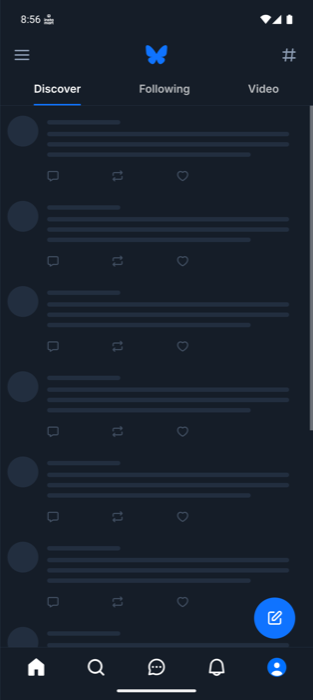
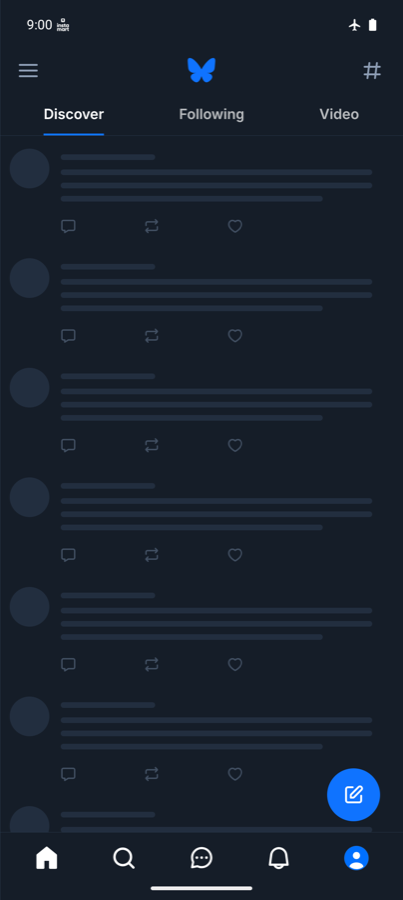
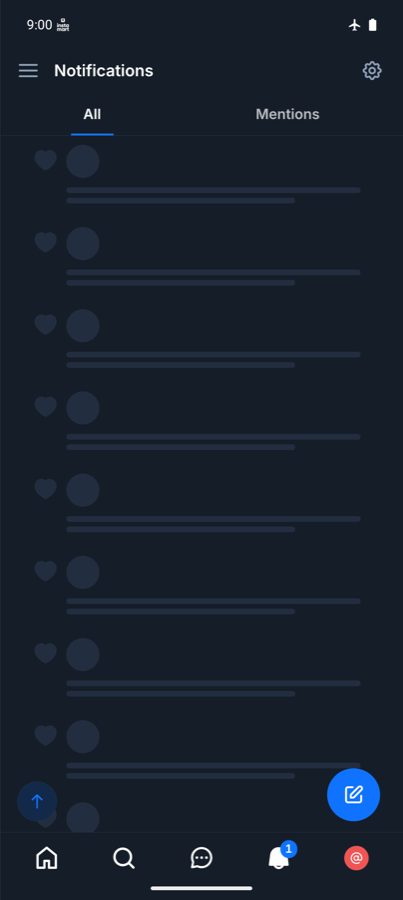
Only screenshots with no user content are published. The other evidence is recorded as text.
Launch and startup (Chapter 7)
Section titled “Launch and startup (Chapter 7)”| Probe | What was seen | Reading | Confidence |
|---|---|---|---|
| P7.1 Cold against warm | Three cold starts drew a first frame after 1.1, 3.0 and 2.9 seconds. A return to the running app took 0.6 seconds. | A real cold start with visible work, and a resume that does none | Observed |
| P7.2 First-screen strategy | Splash, a blank frame, the home layout with gray placeholder rows, then posts | Skeleton placeholders. The first frame does not wait for content | Observed |
| P7.3 Launch in airplane mode | Opened signed in, with the home layout and placeholders. No posts, no error and no offline message in 30 seconds | The session check is local. Content is not stored across launches | Inferred |
| P7.4 Where it lands | Home after a force-quit from another tab, and Home after the process was ended from a post thread | The app always lands on Home and does not save the last screen | Inferred |
Navigation and links (Chapter 8)
Section titled “Navigation and links (Chapter 8)”| Probe | What was seen | Reading | Confidence |
|---|---|---|---|
| P8.1 Tab histories | A tab switch, an opened post and 20 seconds in the background each returned to the same posts at the same pixel positions | Each tab has its own stack, kept alive while another tab shows | Inferred |
| P8.3 Process death mid-task | With a thread open, the process was ended the way the system does it. The app cold-started on Home | Navigation state is held in memory only, or is restored under a time limit | Speculative |
| P8.5 Link while signed in | A link to a profile, opened with the app closed, cold-started the app on that profile | A router maps the link to a screen from a cold start | Observed |
| P8.6 Back after a link | Back from that profile led to the Home feed, inside the app | A synthesized back stack | Inferred |
| P8.7 Link into a running app | The profile opened over the feed, and back returned to the feed | The target is presented over the current place | Observed |
Data, caching and offline (Chapters 9, 11, 12, 13)
Section titled “Data, caching and offline (Chapters 9, 11, 12, 13)”| Probe | What was seen | Reading | Confidence |
|---|---|---|---|
| P11.1 Memory or disk | Offline, the feed and an opened thread stayed visible while the app was alive. After a force-quit they were gone | The data cache is in memory only | Inferred |
| P12.1 Offline read | Visited screens kept their content offline. Tabs never opened showed placeholders | Offline Level 1 within one run of the app, Level 0 across launches | Inferred |
| P11.6 Unvisited detail | Offline, a post never opened showed its thread header at once, with image, exact time and counts | The detail screen is seeded from data the feed row already carried | Inferred |
| P9.5 Failed refresh | Offline, a pull to refresh left the posts in place. No error or banner was seen 2, 8 and 22 seconds later | The content stays and nothing reports the failure | Inferred |
| P13.2 Recovery | With the feed stuck on placeholders, the network was restored and the app was not touched. Posts appeared 6 to 12 seconds later | The app watches the network and resumes waiting requests by itself | Inferred |
| P4.1 Footprint | User data went from 6.3 MB to 7.2 MB in 20 minutes of browsing. The cache figure went from 10.2 MB to 29.5 MB | A cache filled by visits, held in the area the system counts as cache | Inferred |
| P11.5 Clear cache | The app’s own Clear image cache control dropped the cache from 29.5 MB to 7.2 MB. User data and the session were untouched | The control clears a disk cache of images and nothing else | Inferred |
Put together, these seven probes give a precise picture: posts live in memory and are refetched on every launch, while images are cached on disk. That is why the storage figure grows although the feed is gone after a force-quit.
Lists, UI technology and the rest
Section titled “Lists, UI technology and the rest”| Probe | What was seen | Reading | Confidence |
|---|---|---|---|
| P15.5 Refresh a ranked feed twice | Three refreshes of the Discover feed. The leading posts came from different accounts after the second and third | The backend returns a fresh ranking on each request | Inferred |
| P32.1 Long-press text | No selection handles or copy menu on post text in the feed, or on a tab label | Text is not selectable on this screen | Observed |
| P32.2 Raise the system text size | From 1.0 to 1.5, the Discover tab label grew from 192 by 60 to 290 by 78 pixels at once, with no relaunch | Text follows the system size, apparently with a cap | Speculative |
| P38.1 Licenses screen | Settings, About lists terms, privacy policy, status page, system log, the cache control, an error report and the version. No licenses screen | No such screen was found | Observed |
The design, as read from outside
Section titled “The design, as read from outside”Before the source was opened, the worksheet said this:
- Startup. A local session lets the app draw its home layout at once. Content is fetched after the first frame, behind placeholders. Nothing about the last screen is saved.
- Data. One in-memory cache serves every screen, and a detail screen starts from the row that led to it. The cache dies with the process. Only a little state survives a launch: the session, the list of feeds, and preferences.
- Images. A separate disk cache, which the user can clear.
- Offline. No offline mode and no offline message. Requests wait, and resume when the network returns.
- Navigation. A tab bar with one stack per tab. Links are routed to a screen with a Home screen placed under it.
- Backend implied. A read API that returns feed rows complete enough to draw a thread header, and a feed service that ranks on every request.
Checked against the source
Section titled “Checked against the source”| Conclusion | Verdict | What the source shows |
|---|---|---|
| Placeholders on the first screen (P7.2) | Confirmed | The feed renders a PostFeedLoadingPlaceholder component while loading |
| Feed data is in memory only (P11.1, P12.1, P7.3) | Confirmed | src/lib/react-query.tsx saves a query to disk only when its key carries a persistedVersion. The post feed’s key does not. The keys that do are feed information, preferences, labeler details, join links and chat status, which matches the feed tabs and interests that were visible offline |
| No saved navigation state (P7.4, P8.3) | Confirmed | The navigation container in src/Navigation.tsx is given no initial state and saves none. This settles the Speculative reading of P8.3: memory only, not a time limit |
| One stack per tab (P8.1) | Confirmed | A bottom tab navigator holds a separate stack navigator for Home, Search, Notifications, Messages and Profile |
| Links open the item (P8.5) | Confirmed | The linking configuration lists https://bsky.app among its prefixes |
| Synthesized back stack (P8.6) | Confirmed | getStateFromPath builds the state with a Home route under the target. Its comment says the Home tab must be initialized “otherwise the back button will not work” |
| Detail seeded from the list (P11.6) | Confirmed | The thread query searches the feed, notification, search and other caches for the post and uses it while the thread loads |
| Recovery without user action (P13.2) | Confirmed | The app listens for network changes, checks every two seconds while it believes it is offline, and tells the query library when the network is back |
| The control clears images only (P11.5) | Confirmed | The About settings screen calls the image library’s clearDiskCache |
| Text is not selectable in the feed (P32.1) | Confirmed | Only the main post of a thread and translated text are marked selectable. The probe did not try the thread screen, where it would have found selection |
| Nothing reports a failed refresh offline (P9.5) | Consistent | The query library pauses requests while offline instead of failing them, and no offline message was found in the feed component. The refresh path was not traced end to end |
| Link into a running app (P8.7) | Consistent | The behavior comes from the navigation library the app uses. The app adds nothing that contradicts it |
| Storage growth is image cache (P4.1) | Consistent | The image library keeps a disk cache, and clearing it removed the growth. Other contributors, such as video, were not ruled out |
| Text follows the system size (P32.2) | Consistent | Several components set a maximum text scale. The cap on the measured label was not traced |
| No licenses screen (P38.1) | Consistent | No licenses screen was found in the settings source. Absence is hard to prove |
| Fresh ranking on each refresh (P15.5) | Not in the client | The Discover feed is produced by a backend feed generator. The client only asks for it |
| Cold start timing (P7.1) | Not in the client | A measurement, not a design decision in the code |
What the method missed
Section titled “What the method missed”An honest account of where reading from outside fell short in this run.
- The technology. The source shows a cross-platform app built on a mapped toolkit (Chapter 32). The probes that would suggest this, a screen reader walk and a comparison across two platforms, were not run. Nothing in the 20 probes pointed to it.
- One probe could not be run at all. P15.1 needs a fast fling. Scroll commands sent to an emulator are too slow to count as one, so it was left unrecorded instead of guessed.
- One probe was too weak. P11.6 was run on a post with no replies, so a failed fetch of replies would have been invisible. The conclusion happened to be right. On a post with replies it would have been earned.
- One probe stopped too early. P32.1 tested the feed and a tab label. The thread screen, where text can be selected, was not tried.
- Absence is weak evidence. “No error was seen” (P9.5) and “no licenses screen” (P38.1) are the least certain entries, as Chapter 5 says they must be.
- What needs a second device or real time was skipped. Real-time delivery, sync between devices, long absences and anything that writes were out of scope for a read-only run on one emulator.
Run it yourself
Section titled “Run it yourself”The recorded teardown is in the repository under teardowns/bluesky/, with the generated report and the screenshots.
- By hand: install any app on a phone or an emulator, open Chapter 4, and record what you see in the worksheet.
- With an AI coding agent: from the repository, one command hands the playbook to your agent, which runs the probes that one emulator allows and writes the report.
npm run teardown -- xyz.blueskyweb.appReplace the app id with any app installed on your running emulator or simulator.