Worked example: Expensify
This is the second real teardown, run the same way as the Bluesky example: probes on an emulator, outcomes recorded in the worksheet, and every conclusion then checked against source code the app’s maker publishes.
Expensify was chosen because it is the opposite of Bluesky in the way that matters most to this handbook. Bluesky keeps its data in memory. Expensify is built to work offline. If the probes can tell the two apart, they are measuring something real.
They did tell them apart. They also produced three wrong readings, which are listed in full here and have been corrected in the chapters.
The result
Section titled “The result”| App | Expensify for Android, version 9.4.99-2 |
| Device | Android 15 emulator |
| Date | 4 October 2026 |
| Mode | Private test items only. Two test messages in the account’s own self-chat, deleted afterwards. Nothing sent to another person. |
| Probes run | 24, from 9 chapters |
| Source checked | Expensify/App, commit 473e5b0 of 2 October 2026 (version 9.5.1-9, newer than the app tested) |
| Verdict after checking the source | Conclusions |
|---|---|
| Confirmed The code does what the probe concluded | 14 |
| Consistent The code agrees, but the full path was not traced | 6 |
| Not in the client A measurement, not a design decision in the code | 1 |
| Contradicted The reading was wrong | 3 |
Bluesky and Expensify, side by side
Section titled “Bluesky and Expensify, side by side”The same probes, two apps, opposite outcomes. Both sets of outcomes were confirmed by source.
| Probe | Bluesky | Expensify |
|---|---|---|
| P7.3 Launch in airplane mode after a force-quit | Layout and placeholders, no content, no message | The full Home screen, with a line saying the app appears to be offline |
| P11.1 Memory or disk | Content gone after a force-quit | Content present after a force-quit |
| P12.1 Offline read | Visited screens only, while the app is alive | Screens never opened in that run also show their content |
| P12.2 Offline write | Not run, read-only | Accepted at once and drawn dimmed |
| P4.1 Where storage grows | The cache area, by 19 MB | User data, by 2.5 MB. The cache area shrank |
| P32.2 System text size | Text grows | Text does not grow |
| P8.7 Link into a running app | Opens over the current place, back returns there | Replaces the current place, back goes to the link’s parent |
| Offline level, from Chapter 12 | Level 1 within one run, Level 0 across launches | Level 3, a local replica with an outbox |
What was observed
Section titled “What was observed”
Only screenshots with no personal content are published. The other evidence is recorded as text.
Offline and sync (Chapter 12)
Section titled “Offline and sync (Chapter 12)”This is the chapter Expensify exercises best, and the probes ran in sequence on one test message.
| Probe | What was seen | Reading | Confidence |
|---|---|---|---|
| P12.1 Offline read | After an offline cold start, the Inbox listed its chats with previews, and a chat opened with its history from 2025. Neither had been opened in that run | A local replica, filled ahead of need | Inferred |
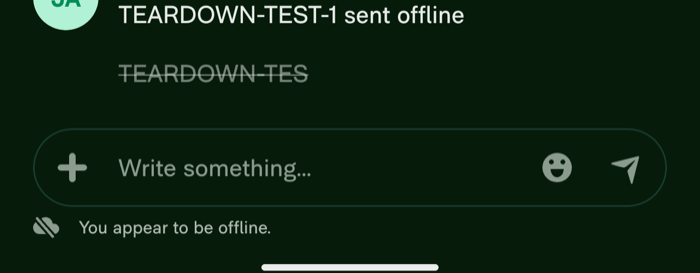
| P12.2 Offline write | A test message sent offline appeared at once, drawn dimmed | An optimistic update with a tracked mutation | Observed |
| P12.3 Kill while pending | Force-quit and offline relaunch. The message was still there, still dimmed, and was the preview on the chat’s Inbox row | The outbox and the local change are stored durably | Inferred |
| P12.4 Reconnect | With the chat closed and the app on its Home tab, the network came back for 25 seconds. Reopened offline, the message was at full brightness and its time had moved from 9:41 to 9:42 PM | A sync engine at app level drains the outbox | Inferred |
Two further things were seen that match signals in the chapter’s table, though no probe asks for them:
- The time shift. The message’s time changed by a minute once it was confirmed. That is the “item order or timestamp shifts slightly after sending” signal: confirmed backend values replacing local ones.
- The pending delete. A second test message deleted offline was struck through and dimmed, and vanished when the network returned. Pending adds and pending deletes are drawn differently.
Startup, storage and state
Section titled “Startup, storage and state”| Probe | What was seen | Reading | Confidence |
|---|---|---|---|
| P7.1 Cold against warm | A splash for about 12 seconds on this emulator. A return to the running app took 1.7 seconds | A real cold start with visible work | Observed |
| P7.2 First-screen strategy | The splash stayed until the complete Home screen appeared. No placeholder frame | A blocking fetch behind a splash | Inferred |
| P7.3 Launch in airplane mode | The same splash, then the full Home screen with content and an offline line | Stored content. The session check is local | Inferred |
| P11.1 Memory or disk | Content present offline before and after a force-quit | Memory and disk | Inferred |
| P11.6 Unvisited detail | Offline, a chat opened with far more than its one-line preview | The data was on the device before the screen was opened | Inferred |
| P9.1 Change and go back | A sent message was the Inbox row’s preview at once, online and offline | One copy of the data serves both screens | Inferred |
| P4.1 Footprint | User data grew from 3.7 MB to 6.2 MB. The cache figure fell from 1.4 MB to 0.9 MB | Stored data that grows with use, kept as user data and not as cache | Inferred |
| P13.2 Recovery | On each return of the network, untouched, the offline line vanished, pending items were sent and missing history filled in | The app watches the network and resumes by itself | Inferred |
P4.2 (launch in airplane mode) and P3.1 (offline tour) were also recorded. They restate P7.3 and P12.2.
Navigation, drafts and links (Chapter 8)
Section titled “Navigation, drafts and links (Chapter 8)”| Probe | What was seen | Reading | Confidence |
|---|---|---|---|
| P8.2 Half a form | An unsent draft survived an app switch and a force-quit | The draft is stored as data, apart from the screen | Inferred |
| P8.4 Force-quit and reopen | Home tab, with the draft back in the composer when the chat was opened | The draft survives. The screen does not | Inferred |
| P7.4 Where it lands | Home after a force-quit from a chat, and after a process death from a chat. Repeated with longer waits, same result | The app does not persist the last screen | Inferred |
| P8.3 Process death mid-task | With a chat open, the process was ended. The app cold-started on Home | Memory only, or a time limit | Speculative |
| P8.5 Link while signed in | A link to a settings page cold-started the app on that page | A router maps the link to a screen | Observed |
| P8.6 Back after a link | Back led to the Account tab, the page’s parent | A synthesized back stack | Inferred |
| P8.7 Link into a running app | From the Inbox, the link opened the page. Back led to the Account tab, not the Inbox | The link replaces the current place | Inferred |
P4.3 (force-quit and reopen) restates P8.4.
UI technology (Chapter 32)
Section titled “UI technology (Chapter 32)”| Probe | What was seen | Reading | Confidence |
|---|---|---|---|
| P32.1 Long-press text | A long press on a message opened the app’s own action list, with Copy message. No selection handles | Text is not selectable there | Observed |
| P32.2 Raise the system text size | From 1.0 to 1.5, labels on the Account tab kept exactly the same pixel bounds. Each change also sent the app back to its Home tab | No screen grows | Observed |
Checked against the source
Section titled “Checked against the source”| Conclusion | Verdict | What the source shows |
|---|---|---|
| Offline writes are optimistic and drawn dimmed (P12.2, P4.2, P3.1) | Confirmed | The maker’s own offline design notes describe queuing a request and proceeding “as if the request succeeded”. A wrapper component dims its content while offline with a pending action |
| The outbox is durable (P12.3) | Confirmed | Queued requests are kept in the app’s persistent store under a key named networkRequestQueue |
| An app-level sync engine drains it (P12.4, P13.2) | Confirmed | A sequential queue in the network layer subscribes to network state and flushes when the device is back online. It belongs to no screen |
| Content is stored on the device (P7.3, P11.1, P12.1) | Confirmed | The app keeps its data in a persistent store that every screen reads |
| Drafts are stored as data (P8.2, P8.4, P4.3) | Confirmed | The store has a collection keyed by chat for draft comments |
| Synthesized back stack for links (P8.6) | Confirmed | The link handler computes a matching full-screen route to place under the target, for back to lead to |
| Text does not follow the system size (P32.2) | Confirmed | The app’s text component turns font scaling off |
| Pending deletes are struck through | Confirmed | The same wrapper applies a strikethrough when the pending action is a delete. Not counted in the score, since no probe asked for it |
| Links open the page (P8.5), replace the current place (P8.7) | Consistent | The link configuration and the adapted-state helper exist and match the behavior. The path was not traced end to end |
| Detail on device before open (P11.6), one copy for list and detail (P9.1), growth in user data (P4.1) | Consistent | All three follow from one persistent store that screens subscribe to. Not traced for these specific screens |
| No text selection, own action list (P32.1) | Consistent | A context menu component provides the copy actions |
| Cold start timing (P7.1) | Not in the client | A measurement |
| A blocking fetch behind the splash (P7.2) | Contradicted | The splash is hidden when navigation is ready and the language is loaded. Both are local. Probe P7.3 had already shown the same thing: the splash ended in content with no network |
| The app does not persist the last screen (P7.4) | Contradicted | The app saves the last visited path to its store on every navigation, and has startup code that restores it. That code returns early for an account on a public email domain. The test account uses a consumer email address, which would explain what was seen, though the flag was not checked on the account itself. The behavior seen was real. The design claim drawn from it was wrong |
| Memory only, or a time limit (P8.3) | Contradicted | Same cause. The reading offered two candidate designs and the true one was neither |
The three wrong readings, and what changed
Section titled “The three wrong readings, and what changed”Each failure had the same shape: the behavior was recorded correctly, and the probe’s reading claimed more than the behavior supports.
1. P7.2 read a splash as a network wait. Its first outcome said “a blocking fetch behind a splash”. A splash can equally cover local work, such as opening a stored database. The probe that separates the two, launching in airplane mode, was the very next one, and it gave the right answer. The reading now names both candidates, points to P7.3 to separate them, and is marked Speculative.
2. P7.4 turned “it landed on Home” into “it does not save the last screen”. Expensify does save it, and restores it for some accounts. From one account, a condition on account type is invisible. The reading now says what was seen and lists conditional restoration as a candidate.
3. P8.3 listed two candidates and missed the third. It now includes conditional restoration and says plainly that one account on one device cannot rule it out.
This is the rule from Chapter 5 applied to the handbook itself: list every candidate design before choosing. All three corrections are in the chapter data, so the next teardown, by a person or an agent, gets the corrected readings.
What else the method missed
Section titled “What else the method missed”- The technology. As with Bluesky, the source shows a cross-platform app, and no probe that was run pointed to it.
- One probe did not apply. P8.1 compares tab histories, but this app hides its tab bar on every pushed screen, so there is no way to switch tabs from inside one.
- A source newer than the app. The code checked is one version line ahead of the build tested. A behavior could differ between them for that reason alone.
- What needs a second device was skipped. Conflicts between two devices, real-time delivery to another person, and anything involving a second account.
Run it yourself
Section titled “Run it yourself”The recorded teardown is in the repository under teardowns/expensify/.
npm run teardown -- org.me.mobiexpensifyg